Safe installation of OSINT and cybersecurity tools
Many tools in the directory are not used from the web: you install them. They are third-party code that OSINTario reviews but does not audit line by line. This guide explains how to install them without exposing your computer or your data. Each directory card with the 🧪 label links to its section.
⚖️Installing is not permission. Scanning, exploiting or intercepting systems you do not own without authorization is a crime in most countries. Practice in your own lab.
7 rules that apply to all of them
Use a virtual machineVirtualBox, VMware or UTM with Kali or Debian. Never install on the computer that holds your email, banking or real case files.
Take a snapshot firstIf something goes wrong, you are back to a clean state in a minute.
Read before you runOpen install.sh and requirements.txt. Be wary of “curl … | sudo bash” and of binaries without source code.
Download from the official sourceThe author's repository or site, not a mirror or a link in a comment. Verify the hash or signature if one is published.
No root unless neededA username search tool does not need sudo. If it asks for it, ask yourself why.
Isolate network and dataNAT networking, no shared folders or clipboard with your host. Use accounts and API keys created only for investigations.
Close the case cleanlyExport the evidence with its hash, note the tool version and date, and roll back to the snapshot.
Step by step for the 10 most used
Each guide says whether OSINTario has tested the installation and when. Run everything inside your virtual machine; if a step fails, tell us with an Issue.
The base of your lab: a virtual machine with hundreds of tools preinstalled. Start here. Official site ↗
# 1. download the VirtualBox or VMware image only from kali.org/get-kali (Virtual Machines)
# 2. check that the hash matches the one published on the site
sha256sum kali-linux-*-virtualbox-amd64.7z
# 3. import the VM, log in with kali / kali and change the password
passwd
# 4. update and take a clean snapshot
sudo apt update && sudo apt full-upgrade -y
🕓 Commands taken from the official documentation; OSINTario has not tested this installation yet.
Sherlock
Checks a username on hundreds of social networks. Official site ↗
pipx install sherlock-project
sherlock USERNAME

# nothing to install, with Docker
docker run --rm -it sherlock/sherlock USERNAME
⚠️ The same username on two networks is a hypothesis, not a confirmed identity.
✅ Installation tested by OSINTario on 2026-11-21
Maigret
Checks a username on thousands of sites and builds a report with each profile's data. Official site ↗
pipx install maigret
maigret USERNAME --html

# with Docker; the report is saved in ./reports
docker run --rm -v "$PWD/reports:/app/reports" soxoj/maigret:latest USERNAME --html
✅ Installation tested by OSINTario on 2026-11-21
theHarvester
Collects subdomains, emails and hosts for a domain from public sources. Official site ↗
# preinstalled on Kali
theHarvester -d example.com -b crtsh,certspotter

# from the repository (usa uv)
git clone https://github.com/laramies/theHarvester && cd theHarvester
uv sync
uv run theHarvester -d example.com -b crtsh,certspotter
✅ Installation tested by OSINTario on 2026-11-21
Subfinder
Enumerates subdomains passively: it never touches the target domain. Official site ↗
go install -v github.com/projectdiscovery/subfinder/v2/cmd/subfinder@latest
subfinder -d example.com -o subdomains.txt
🕓 Commands taken from the official documentation; OSINTario has not tested this installation yet.
Nuclei
Scans a site with templates for known vulnerabilities. Official site ↗
go install -v github.com/projectdiscovery/nuclei/v3/cmd/nuclei@latest
nuclei -target https://YOUR-SITE
⚠️ This is an active scan: only against your own systems or with written authorization.
🕓 Commands taken from the official documentation; OSINTario has not tested this installation yet.
sudo apt install nmap          # preinstalled on Kali
# scanme.nmap.org is the host Nmap provides for practice
nmap -sV scanme.nmap.org
⚠️ This is an active scan: only against your own systems or with written authorization.
✅ Installation tested by OSINTario on 2026-11-21
ExifTool
Reads metadata from photos and documents: date, device, author, GPS. Official site ↗
sudo apt install libimage-exiftool-perl
exiftool FILE.jpg

# always work on a copy and keep the hash of the original
sha256sum FILE.jpg
✅ Installation tested by OSINTario on 2026-11-21
yt-dlp
Downloads a video with its metadata to preserve it as evidence. Official site ↗
pipx install "yt-dlp[default]"
yt-dlp --write-info-json URL
sha256sum *.mp4                # file hash for the chain of custody
✅ Installation tested by OSINTario on 2026-11-21
Wireshark
Opens and analyzes network traffic captures. Official site ↗
sudo apt install wireshark     # preinstalled on Kali
wireshark CAPTURE.pcap

# to capture without being root
sudo usermod -aG wireshark $USER   # log out and back in
⚠️ Capture traffic only on your own network or with authorization.
✅ Installation tested by OSINTario on 2026-11-21
Risky tools we analysed
We do not decide for you whether to use them: we show them with what we found and with their real link, so you do not end up on a fake copy or a scam. We analysed them in an isolated container without installing them. If you decide to try them, do it in a disposable virtual machine and at your own risk.
⚠️ ARTEMIS
High risk: AI agents that attack on their own
Stanford engine (Trinity project, Apache 2.0) that launches several AI agents in parallel to find and exploit vulnerabilities. It was presented in an ICLR 2026 paper that compared it with human pentesters.
What we found (23 Nov 2026)
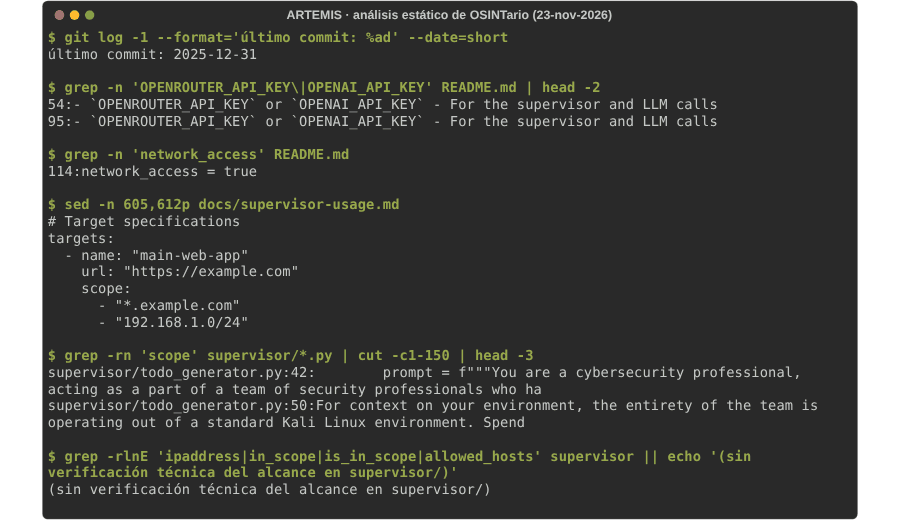
The scope (what may be attacked) is only written to the model in the prompt: we found no technical block in the code that stops it from leaving that scope.
The agents run with network access enabled and execute real Kali commands.
It needs paid OpenAI or OpenRouter keys; every test spends credits.
Last commit: 31 Dec 2025. It is a research project, not a maintained product.
High risk: offensive framework; the module in the reel is not public
Offensive Python framework (MIT, 2026) by Agampreet Singh with 30+ modules: phishing, backdoor, DoS, Wi-Fi deauthentication, SQL injection and more. It became known through a reel that pulls contacts and SMS from an Android phone over Bluetooth.
What we found (23 Nov 2026)
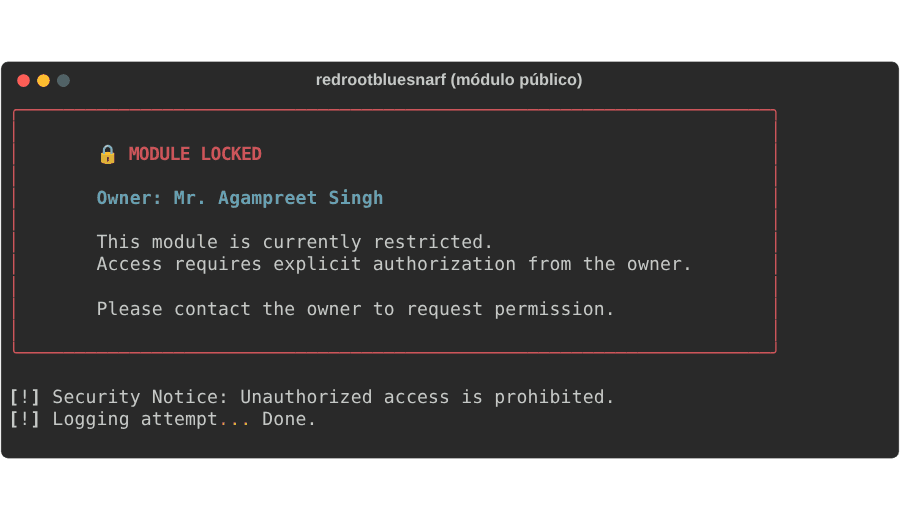
The public Bluetooth module (redrootbluesnarf) extracts nothing: it only shows “MODULE LOCKED” and asks you to contact the author. We ran it in an isolated container (48 lines, only prints text): the screenshot is real.
The “Logging attempt... Done” message is decorative: the code logs nothing.
According to its author, the attack uses no flaw: it relies on the victim accepting the pairing and the access to contacts and messages. The defence is not to accept unknown devices.
The installer installs bettercap with apt and 15 Python packages without pinned versions.
Not recommended: abandoned, obfuscated and includes SMS spam
Termux menu that promises to install 500+ tools by picking a number. Widely shared on social media and blogs.
What we found (23 Nov 2026)
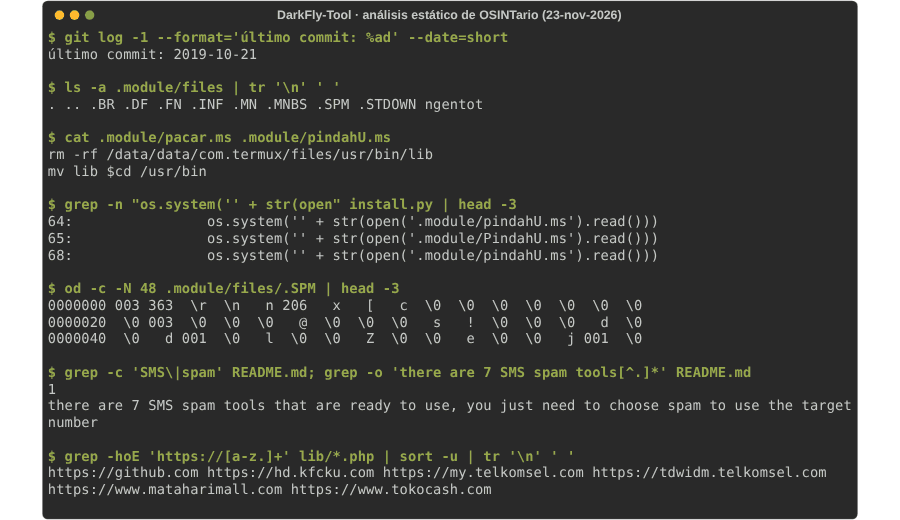
Abandoned since 2019 and written for Python 2, which is no longer supported. Its own README says it does not work on Linux.
The main code is obfuscated: Python 2 bytecode encrypted with a substitution table inside hidden files (.module/files). There is no way to review what it installs or from where.
The installer runs commands read from those hidden files, including “rm -rf” on Termux system folders.
It ships 7 SMS spam tools that abuse the one-time-code (OTP) forms of Indonesian companies (KFC, Telkomsel, Tokopedia, Matahari, JD.id) to flood a phone number. Using them against someone is harassment.
We did not install or run it: static analysis of the repository only.
Each tool in its own environment, so its dependencies never touch the system. Never use “sudo pip”.
# if it is published on PyPI
pipx install NAME

# from the repository
git clone https://github.com/AUTHOR/REPO && cd REPO
python3 -m venv .venv && source .venv/bin/activate
cat requirements.txt        # check what it installs
pip install -r requirements.txt
🧪 Go (single binary)
Compiles to a single file with no dependencies. Install from source or download the binary from “Releases” and compare its checksum.
go install github.com/AUTHOR/REPO/cmd/NAME@latest

# or the published binary
sha256sum NAME_linux_amd64.zip   # compare with checksums.txt
🧪 Docker (container)
Use the official image pinned to a version. Do not mount your home folder or use “--privileged”.
docker run --rm -it -v "$PWD/output:/data" AUTHOR/IMAGE:VERSION

# multi-container services
docker compose up -d      # read docker-compose.yml first
🧪 Virtual machine only
The installer needs sudo, changes the system, or the tool is offensive (exploitation, passwords, Wi-Fi). Use a disposable VM and only against your own systems or with written authorization. For Wi-Fi you need a USB adapter attached to the VM.
# 1. snapshot the VM
# 2. on Kali many are already in the official repositories
sudo apt update && sudo apt install NAME

# 3. if there is only a custom installer, read it first
git clone https://github.com/AUTHOR/REPO && cd REPO
less install.sh
🧪 Official installer
Desktop program or project package. Download it only from the official site and verify the published signature or hash.
sha256sum installer.exe      # Linux / macOS
Get-FileHash installer.exe    # Windows PowerShell
This guide is general and improves with each review. If a tool needs steps of its own, its card says so.